Versions, environments and deployments
A version is a numbered snapshot of a Web Agent that cannot change. An environment is a named place, such as Production or Staging, that serves one version to the pages that load it. A deployment is the choice of which version an environment serves.
How it works
Everything you change in the agent's tabs is saved to the draft. The agent's header shows the draft with the number it will get, for example Draft v4 · unpublished changes.
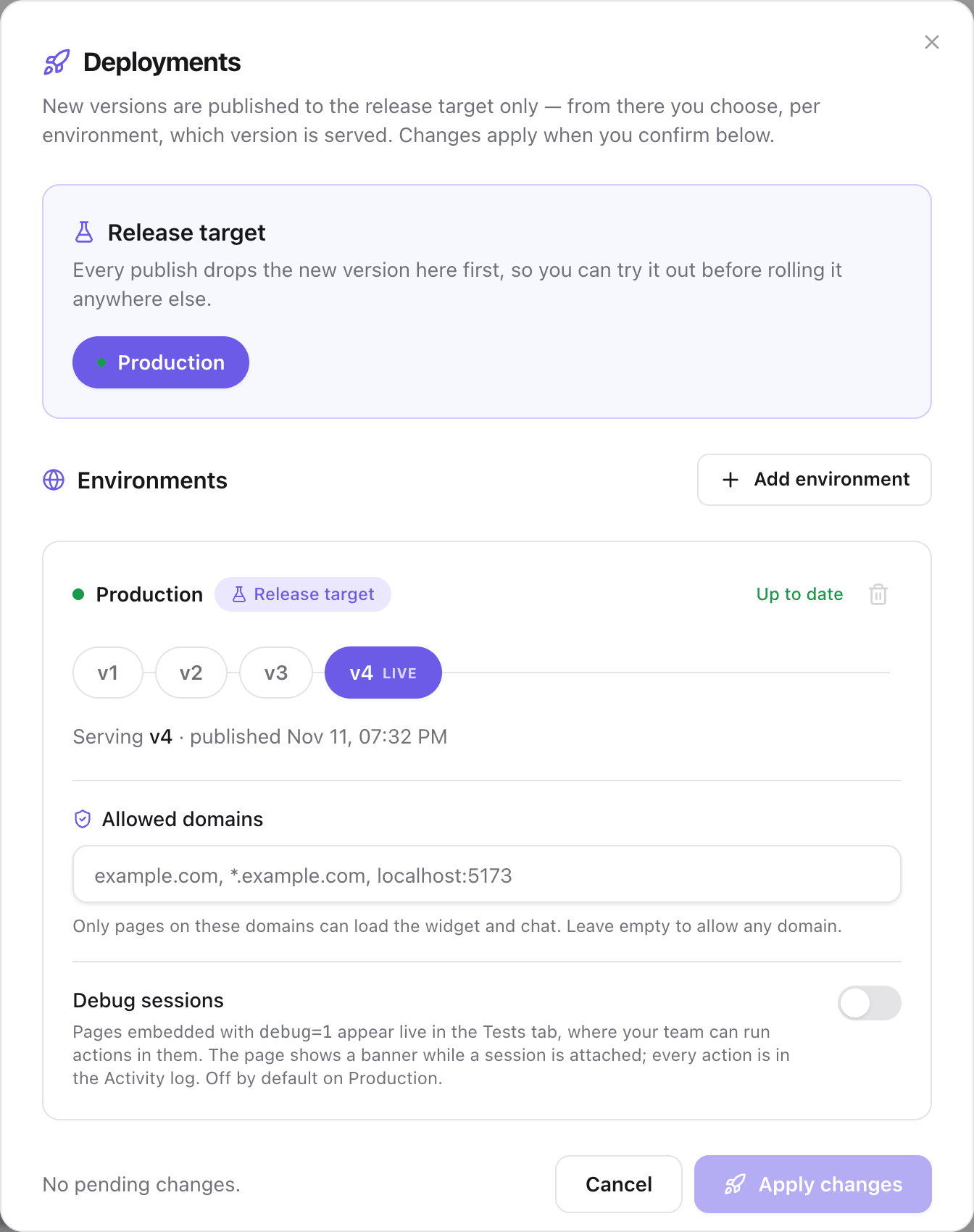
Publish turns the draft into the next version and serves it on the release target, which is the environment that receives every new version. The other environments keep the version they serve until you deploy a version to them in the Deployments dialog.
A page gets the version of its environment each time it loads. Deploying a version moves a pointer. Nothing is built, and your app does not change.
Versions
A version contains what the agent is:
- The modules and actions, and which of them are enabled.
- How the agent authenticates and navigates.
- The variables and their default values.
- The persona.
- The appearance, including voice.
- The Guide's app map, when the agent has one.
A version does not contain what belongs to an environment or to the agent as a whole: the variable values of each environment, the allowed domains, the debug sessions switch, and the identity verification secret and its Enforce verification switch. Changes to those apply without a publish.
The Versions tab lists every version, newest first, with what changed in it and a Live on badge for each environment that serves it.
Environments
A new agent has the environments you selected in the wizard, where Staging is selected to begin with. You add others in the Deployments dialog. Each environment has:
| Setting | What it does |
|---|---|
| Served version | The version that pages of this environment get. |
| Variable values | The values the actions read in this environment. See Set variables for each environment. |
| Allowed domains | The hosts where the widget can load. See Restrict the domains that can load the agent. |
| Debug sessions | Whether a page of this environment can open a debug session. Off on Production by default. See Open a debug session. |
Your app chooses the environment a page loads, with env in the install snippet. A page that names no environment loads Production, or the agent's first environment while it has no Production.
The release target
The release target is the environment where every publish is served immediately. On a new agent it is the first environment you selected in the wizard. When it is the environment your site loads, Publish reaches your users directly.
To try a version before your users get it, add an environment such as Staging and make it the release target. Publishing then serves the new version on Staging only, and you deploy it to Production when it is ready. This is the recommended setup once the agent is on a live site.
The agent's header lists each environment with the version it serves and marks the release target.
What to know before you publish
| Consideration | Description |
|---|---|
| Publish serves the version | The release target serves the new version as soon as the publish finishes. If the release target is Production, your users get it on their next page load. |
| Variables must have a value | A publish fails if a variable has no default and no value on the release target. A deployment fails for the same reason on the environment you deploy to. |
| The draft is shared | The portal and the Advanced editor write the same draft. A publish includes every unpublished change, whoever made it. |
| A rollback does not change the draft | Serving an earlier version leaves the draft as it is. The next publish includes the changes you rolled back from. |
Next steps
- Publish a version: turn the draft into a version.
- Deploy a version to an environment: choose what each environment serves, add environments and move the release target.
- Roll back to an earlier version: serve the previous version again.
- Restrict the domains that can load the agent: set the allowed domains of each environment.
- Open a debug session: connect a page of your app to the portal.
Last updated November 13, 2026