Connections
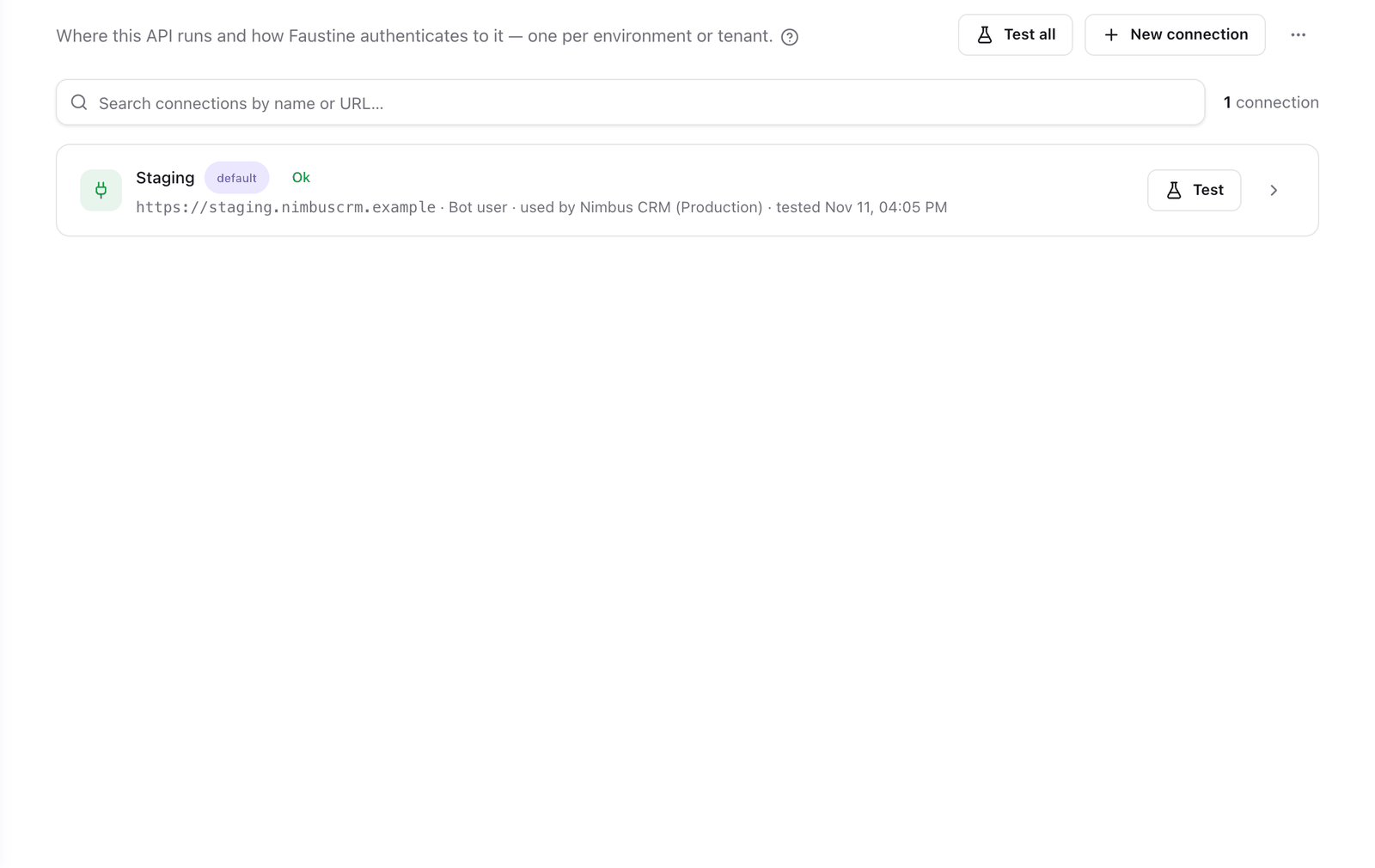
A connection is one running deployment of an API: its endpoint and the values of the credential Faustine uses to call it. Connections live in the Connections tab of the API. An API usually has one per environment, such as Staging and Production, or one per customer or region.
How it works
An operation says what to call: a method and path, a GraphQL field or a gRPC method. A connection says where. The gateway joins the two when an agent calls the operation, so the same operation runs unchanged against every connection.
How Faustine signs in is not part of the connection. The strategy, the login route or token URL and any sign-in script belong to the API. See Authentication. A connection holds only what differs from one deployment to the next.
What a connection holds
| Field | Description |
|---|---|
| Name | An environment, a customer, a region or a partner. Unique within the API. |
| Base URL | Where the deployment is reachable. For REST, the paths of the operations are appended to it. For GraphQL, it is the GraphQL endpoint itself. For gRPC the field is Address (host:port), with the transport settings. |
| Credential values | What the API's strategy needs. See the table that follows. |
| Labels | Optional key=value tags, such as env=prod or region=eu-west-1. Gateways route by them. |
| Test call | The read operation Faustine calls to test the connection, and its input. |
The credential values depend on the strategy set on the API.
| The API signs in with | The connection holds |
|---|---|
| API key / static token | Key |
| Bot user | Username and Password |
| OAuth client | Client ID and Client secret |
| Custom (code) | Variables: a value for each connection.vars.NAME the sign-in function reads |
| Pass-through, No authentication | Nothing |
Secrets are stored encrypted and are never shown again. To replace one, enter the new value. An empty field keeps the stored value.
Default connection
One connection of each API is the Default connection. Gateways that do not pick a connection for an environment use it. To change the default, turn on Default connection on another connection.
Production connections
Turn on Production connection for a connection that holds real customer data. Tests never run against it. Test suites cannot select it, and the test panels of operations and recipes list it as unavailable. A test that names it anyway, such as a suite run that Faustine AI starts in the Advanced editor, is refused with Connection "<name>" is marked as production: tests never run against it. Pick a staging or sandbox connection.
Gateways serve a production connection to agents as usual. Test and Test all in the Connections tab still work, because they call one read operation.
If every connection of an API is marked as production, add a staging or sandbox connection before you run tests.
Test a connection
Test on a connection's row calls its saved read operation through the connection and shows the result on the row. Test all does the same for every connection. Each test is a real call to your API, and the portal asks you to confirm before it runs.
A connection whose last test failed is marked degraded, and the gateways that use it report it. A connection that lacks a value the API's strategy needs is marked needs credentials. The gateway does not call through it until you add the value.
Faustine calls your API from its own servers. A host that only resolves on your machine, such as localhost, is not reachable.
Import connections
To add several connections at once, select More actions next to New connection, then Import from JSON / CSV…. The file is a JSON array or a CSV file with one connection per row. A row that fails does not stop the others.
| Column | Value |
|---|---|
name |
Required. Unique within the API. |
baseUrl |
Required. |
isDefault |
true or false. |
isProduction |
true or false. |
secret |
API key / static token: the key. |
username, password |
Bot user: the credentials of the bot account. |
clientId, clientSecret |
OAuth client: the client registered at the identity provider. |
vars.<NAME>, secret.<NAME> |
Custom (code): the variables the script reads. vars.* are plain and secret.* are write-only. |
labels.<key> |
A label, such as labels.env. |
name,baseUrl,isDefault,isProduction,secret,labels.env
Production,https://api.nimbuscrm.example,true,true,<KEY>,prod
Staging,https://staging.nimbuscrm.example,false,false,<KEY>,staging
How gateways use connections
Connections are defined on the API. Each gateway that serves the API decides, for each of its environments, which connections it uses and how calls are routed among them. See Add an API to a gateway and Environments.
Deleting a connection cannot be undone. Gateways that used it as their default fall back to the API's default connection.
Next steps
- Add a connection: the steps of the New connection wizard.
- Authentication: choose how every connection signs in.
- Add an API to a gateway: serve the API through one of its connections.
- Promote from one environment to another: carry a gateway's setup, with its connections, to the next environment.
Last updated November 13, 2026